Stay Updated on Workspace Organization!

Subscribe to Tidy Workspace Lab for expert tips and updates on creating a clutter-free workspace.

Enhance Cable Management with Monitor Arms


monitor arm accessories for better cable management

Posted on: 2025-12-22
By: Maya J. Ellison


Creating a workspace that fosters productivity involves more than just choosing the right equipment; it's about how you manage your environment. With effective cable management, you can transform your workspace from chaotic to calm, enhancing both aesthetics and function. Are you ready to elevate your work experience?

What You Will Learn

  • Improved Aesthetics: Discover how organized cables can create a professional and inviting workspace.
  • Safety First: Learn about the importance of reducing tripping hazards with effective cable management solutions.
  • Enhanced Productivity: Understand how a tidy workspace contributes to better focus and work efficiency.
  • Built-in Features: Explore various monitor arms with integrated cable management solutions for a clutter-free setup.
  • Ergonomic Setup: Find out how monitor arms can improve your posture and reduce eye strain while elevating monitors.
  • Visual Aids: Learn about the benefits of using infographics and videos for easier setup and maintenance of your workspace.
  • Long-Term Durability: Get tips on what to look for in user reviews to ensure the longevity of your monitor arm accessories.
  • Advanced Solutions: Discover advanced cable management options like cable raceways and desktop systems to streamline your workspace.

Key Benefits of Effective Cable Management

Organized cables enhance your workspace by improving aesthetics, safety, and productivity. The following visual highlights these benefits:

Improved Aesthetics

A clutter-free desk looks professional and inviting, making it easier to focus.

Increased Productivity

An organized workspace allows for better concentration, leading to improved work efficiency!

Ergonomic Benefits

Monitor arms promote better posture and reduce neck strain while freeing up desk space.

Understanding Monitor Arm Accessories for Enhanced Cable Management

When it comes to creating a tidy workspace, understanding the role of monitor arm accessories is crucial. Not only do these accessories help manage cables effectively, but they also significantly enhance the overall look of your desk. Imagine entering your workspace and seeing neat, organized cables instead of a chaotic tangle! This simple change can lead to improved aesthetics and a more focused atmosphere.

Beyond the visual appeal, organized cables contribute to safety in your home office. Loose cables can become a tripping hazard or get damaged easily, leading to potential electrical issues. By investing in effective cable management solutions, like those offered by Tidy Workspace Lab, you're not just beautifying your workspace—you're also promoting a safer and more productive environment.

monitor arm installation tips for beginners
Monitor Arm Installation for Beginners

Transforming your workspace starts before you even

benefits of using a gas spring monitor arm
Advantages of Gas Spring Monitor Arms

Are you tired of discomfort and fatigue while work

The Importance of Cable Management in Workspaces

Having organized cables brings numerous benefits to your workspace. Here are some key advantages:

  • Improved Aesthetics: A clutter-free desk looks professional and inviting, making it easier to focus.
  • Enhanced Safety: Keeping cables neatly tucked away reduces the risk of tripping and cable damage.
  • Increased Productivity: When your workspace is organized, you can concentrate better, leading to improved work efficiency!

At Tidy Workspace Lab, we understand that a tidy workspace is essential for productivity. By prioritizing cable organization, you can create an environment that not only looks good but also supports your work habits. So, take a moment to assess your current setup—are your cables adding to the chaos or contributing to your productivity?

Discovering Built-in Cable Management Features in Monitor Arms

As we delve into monitor arms, one exciting feature to explore is their built-in cable management solutions. Many modern monitor arms come equipped with integrated features that simplify the process of keeping those pesky cables in check. This is particularly beneficial for setups with multiple monitors, where the potential for clutter can really skyrocket.

Let's take a look at some of the common built-in cable management features you can find in various monitor arms:

  • Cable Clips: These handy clips help secure cables along the arm, preventing them from dangling or getting tangled.
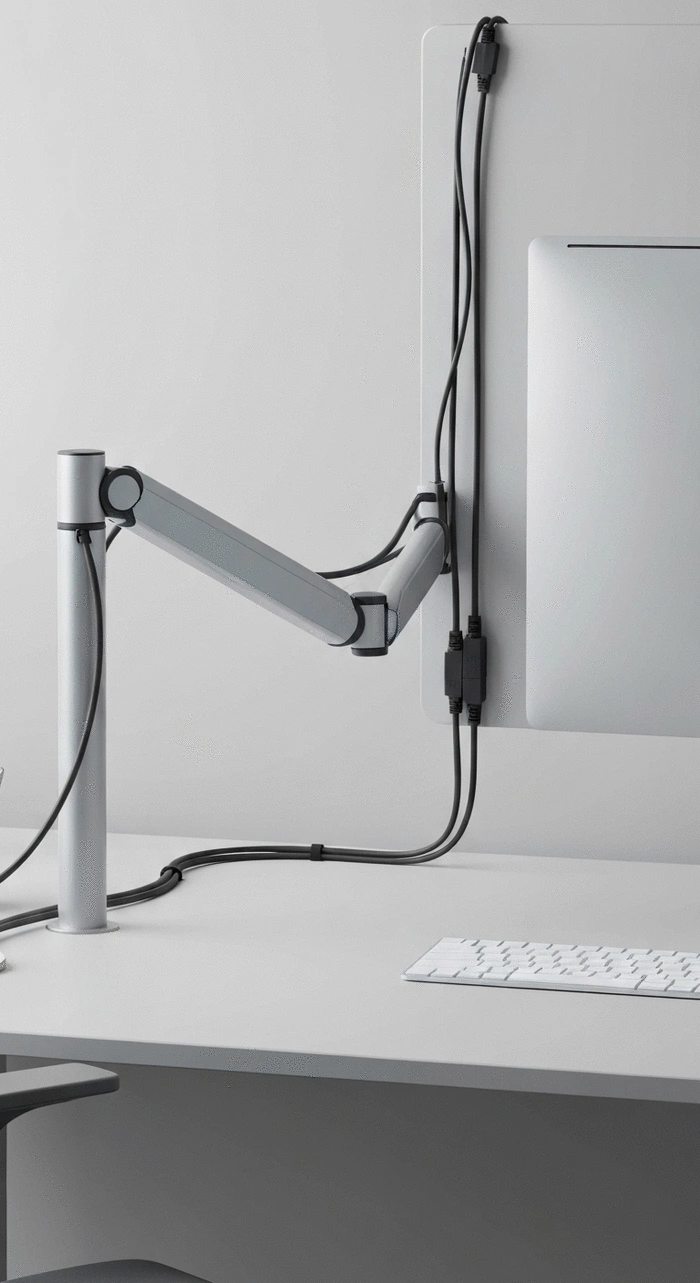
  • Cable Channels: Some monitor arms include channels that guide cables neatly along the back of the arm and down to the desk.
  • Built-in Cable Management Trays: These trays not only hold the cables in place but also provide additional space for power supplies and other accessories.

By incorporating these features, monitor arms become essential tools for maintaining a clutter-free workspace. Choosing the right monitor arm with integrated cable solutions can make a significant difference in how you experience your workspace. So, next time you're shopping for a monitor arm, keep an eye out for these features—they might just be the solution you've been looking for!

Types of Monitor Arms with Integrated Cable Solutions

When selecting a monitor arm, it’s essential to choose one that fits your needs while also offering effective cable management. Here’s a breakdown of popular types of monitor arms that include integrated cable solutions:

  • Articulating Monitor Arms: These arms allow full range movement and often come with cable channels for seamless organization.
  • Fixed Monitor Arms: Best for static setups, they usually feature clips to keep cables organized without much movement.
  • Dual and Triple Monitor Arms: Ideal for multitaskers, these arms often include multiple cable management solutions to handle extra cords.

By selecting a monitor arm with built-in cable management, you can effortlessly enhance both the functionality and aesthetics of your desk. At Tidy Workspace Lab, we believe that every detail counts when it comes to achieving that perfect workspace! So, take your time to explore these options and find one that fits your setup beautifully.

Ergonomic Benefits of Using Monitor Arms with Cable Management

Using monitor arms equipped with cable management features can also contribute positively to your ergonomic setup. Here’s how they help, especially for dual and triple monitor configurations:

  • Adjustable Height: Monitor arms allow you to set your screens at the ideal height, promoting better posture and reducing neck strain.
  • Free Up Desk Space: By elevating your monitors, you gain valuable desk space, making room for other essential items.
  • Improved Viewing Angles: With flexible positioning, you can adjust screens for optimal viewing, reducing eye fatigue.

These ergonomic advantages can significantly enhance your comfort during long hours of work. I always encourage my clients to consider these factors while setting up their workspaces. It’s not just about aesthetics—creating a workspace that supports your body will lead to more productive days ahead!

FAQs About Monitor Arm Accessories and Cable Management

Before investing in a monitor arm, many users have questions about compatibility, features, and benefits. Here are some frequently asked questions to help you make an informed decision:

What are the key benefits of using a monitor arm with integrated cable management?
Monitor arms with integrated cable management enhance aesthetics, improve safety by reducing tripping hazards, and increase productivity by creating a more organized workspace. They also offer ergonomic benefits such as adjustable height and improved viewing angles.
What types of monitor arms offer integrated cable management solutions?
Articulating monitor arms, fixed monitor arms, and dual/triple monitor arms often come with integrated cable management features like cable clips, channels, and trays to keep cables organized.
How do monitor arms contribute to better ergonomics?
Monitor arms allow you to adjust the height and viewing angles of your screens, promoting better posture and reducing neck and eye strain. They also free up valuable desk space, contributing to a more comfortable and productive workspace.
What should I look for in user reviews to ensure the long-term durability of monitor arm accessories?
When checking user reviews, pay attention to comments about the material quality, ease of installation, and how well the product performs over time. Look for feedback on whether the accessories withstand regular use and maintain their functionality.
What are some advanced cable management options to further streamline my workspace?
Advanced options include cable raceways to hide extensive cable runs, power strip mounts to keep outlets tidy, and desktop cable management systems for quick access to cables when needed.

Leveraging Visuals for Enhanced Understanding of Setup Techniques

In today’s digital age, visuals play a crucial role in grasping the setup techniques for monitor arms and cable management. Including infographics or videos can significantly enhance the learning experience, making it easier for you to visualize the installation process. Trust me, there’s nothing quite like watching a step-by-step guide unfold in front of you!

Imagine being able to see how cables are routed through a monitor arm’s built-in management features. This can help you understand not only how to set it up properly but also how to maintain that clutter-free workspace you desire. Visual aids can transform a daunting task into a straightforward, manageable one.

  • Infographics illustrating cable routing techniques
  • Video tutorials showcasing real-time installations
  • Step-by-step diagrams for different monitor setups

Step-by-Step Visuals for Installation on Sit-Stand Desks

When it comes to installing monitor arms on sit-stand desks, having clear visuals can make all the difference. Using engaging graphics or videos can guide you through the process, ensuring that you don’t overlook any essential steps. Plus, seeing how everything fits together can be incredibly satisfying!

Here are some great visual formats to consider for your setup:

  • Interactive step-by-step videos with expert tips
  • Static images with annotated features for clarity
  • Before-and-after visuals to inspire transformation

Common Queries Addressed for Better Setup

As someone who loves to keep a tidy workspace, I know how important it is to address common questions about monitor arm accessories. Let’s dive into some frequently asked questions that can help you optimize your setup:

  • What are the best cable clips for dual monitors?
  • How do I ensure my monitor arm is compatible with my desk?
  • Can I use Velcro straps with my existing cables?

By addressing these queries, you can save time and eliminate confusion, allowing you to focus on creating that perfect workspace with Tidy Workspace Lab’s resources!

Long-Term Durability and User Reviews of Accessories

Before investing in monitor arm accessories, it’s wise to consider their long-term durability. Checking user reviews is essential in selecting the right products that can withstand the test of time. After all, you want your workspace to not only look great but also function efficiently!

For example, when assessing the long-term durability of a monitor arm like the Ergotron LX Desk Monitor Arm, user reviews often highlight the build quality and stability over extended periods of use. These insights can be invaluable in making an informed purchase decision.

Here are some key points to keep in mind when looking at reviews:

  • Material quality of the accessories
  • Ease of installation and use
  • Customer feedback regarding performance over time

Summarizing the Benefits of Effective Cable Management in Workspaces

Recap of Essential Accessories for Optimal Cable Management

Let’s take a moment to recap the essential accessories that can make a significant impact on your workspace organization. Having the right tools at your disposal can streamline your cables and enhance your overall productivity.

  • Monitor arms with built-in cable management
  • Cable clips for easy attachment
  • Cable sleeves for a polished finish

By incorporating these accessories, you’ll not only achieve a clutter-free environment but also create a workspace that reflects your personality and promotes focus.

Overview of Advanced Cable Management Options

Finally, let’s explore some advanced solutions for managing cables effectively. These options can take your workspace to the next level, allowing for a clean, organized setup that enhances productivity.

  • Cable raceways for hiding extensive cable runs
  • Power strip mounts to keep outlets accessible yet tidy
  • Desktop cable management systems for quick access

By embracing these advanced solutions, you’ll be well on your way to mastering the art of cable management, ensuring your workspace remains functional and inspiring—just like the vision here at Tidy Workspace Lab!

Recap of Key Points

Here is a quick recap of the important points discussed in the article:
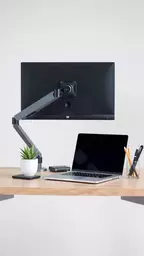
  • Monitor arm accessories are essential for effective cable management, enhancing both aesthetics and safety in your workspace.
  • Built-in cable management features in modern monitor arms, such as cable clips and channels, simplify organization, especially in multi-monitor setups.
  • Choosing the right monitor arm (articulating, fixed, or multi-monitor) can significantly improve your workspace's functionality and appearance.
  • Ergonomic benefits of using monitor arms include adjustable heights and improved viewing angles, which contribute to better posture and comfort.
  • Utilizing visuals like infographics and videos can enhance understanding and execution of setup techniques for monitor arms and cable management.
  • Long-term durability is vital; consider material quality and user reviews before investing in accessories.
  • Advanced cable management options such as cable raceways and desktop systems can further streamline your workspace.

Subscribe & Share
Enhance Cable Management with Monitor Arms monitor arm accessories for better cable management Creating a workspace that fosters productivity involves more than just choosing the right equipment;
Essential Monitor Mount Features to Consider features to look for in a monitor mount Are you ready to transform your workspace into a productivity powerhouse? The right monitor mount ca
Boost Home Office with Monitor Arms adjustable monitor arms for home office efficiency As the trend of remote work continues to rise, the importance of a well-designed home office cannot
Welcome to Tidy Workspace Lab!
Transform Your Workspace Today

At Tidy Workspace Lab, we empower individuals to create organized and aesthetically pleasing home office environments. Our mission is to help you achieve a clutter-free workspace that enhances productivity and well-being.


Recent Posts
monitor arm accessories for better cable management Enhance Cable Management with Monitor Arms

Creating a workspace that fosters productivity inv

features to look for in a monitor mount Essential Monitor Mount Features to Consider

Are you ready to transform your workspace into a p

adjustable monitor arms for home office efficiency Boost Home Office with Monitor Arms

As the trend of remote work continues to rise, the